lnmp之安裝PHP模塊/擴展(不需要重裝PHP)
VPS偵探一直在努力的去營造一個VPS相關話題的交流環(huán)境,于是有了很多的VPS相關的教程、QQ群、有了論壇、有了LNMP一鍵安裝包...,在此說明一下Linux下PHP模塊/擴展都是采用此方法安裝或安裝php直接編譯進去,PHP的dll模塊/擴展文件是Windows下php模塊的使用方法,兩者是無法通用的!!
VPS偵探主要根據(jù)論壇上lnmp版塊用戶反映來寫一些教程,今天說一下如何為lnmp的php安裝一些自己需要的模塊,下面主要有兩種方式進行安裝:源碼編譯方式安裝和pecl方式進行安裝。
源碼編譯安裝
安裝前
安裝前建議先執(zhí)行 /usr/local/php/bin/php -m (此命令顯示目前已經安裝好的PHP模塊)看一下,要安裝的模塊是否已安裝。然后下載當前PHP版本的源碼并解壓。
大部分php擴展/模塊的源碼編譯安裝就是三個步驟,在源碼目錄下執(zhí)行:
/usr/local/php/bin/phpize
./configure --with-php-config=/usr/local/php/bin/php-config
make && make install
有些模塊可能會稍微有差異(如要求添加一些參數(shù)),但是 --with-php-config=/usr/local/php/bin/php-config 是所有PHP模塊最基本的參數(shù)這個是必須要有的,具體看模塊的安裝文檔就可以。
本文以imap和exif模塊為例,進入php源碼目錄下ext,里面會有大部分模塊的源碼,這里都是php自帶模塊,第三方模塊的話需要自己找第三方模塊的源碼。
一、安裝imap模塊
1、安裝imap模塊前需要先安裝imap所需的庫:
CentOS :yum install libc-client-devel
Debian:apt-get install libc-client-dev
2、首先進入php安裝目錄的ext目錄
比如php的源碼目錄為:/root/lnmp1.3-full/src/php-5.4.45/
則執(zhí)行:cd /root/lnmp1.3-full/src/php-5.4.45/ext/? ###一般安裝完LNMP php源碼都是自動刪除了的,需要自己進入src目錄下解壓對應版本的php源碼包。###
我們要安裝imap模塊,執(zhí)行cd imap/
再執(zhí)行 /usr/local/php/bin/phpize 會返回如下信息:
Configuring for:
PHP Api Version:???????? 20041225
Zend Module Api No:????? 20060613
Zend Extension Api No:?? 220060519
再執(zhí)行以下命令:
[root@vpser imap]# ./configure --with-php-config=/usr/local/php/bin/php-config --with-kerberos --with-imap-ssl [root@vpser imap]# make && make install執(zhí)行完返回:
Build complete.
Don't forget to run 'make test'.
Installing shared extensions:???? /usr/local/php/lib/php/extensions/no-debug-non-zts-20060613/
表示已經成功,再修改/usr/local/php/etc/php.ini
查找:extension_dir 再下面一行添加上extension = "imap.so"
保存,執(zhí)行/etc/init.d/php-fpm restart 重啟。
在瀏覽器里面輸入http://ip/p.php,打開探針,安裝IMAP模塊前:
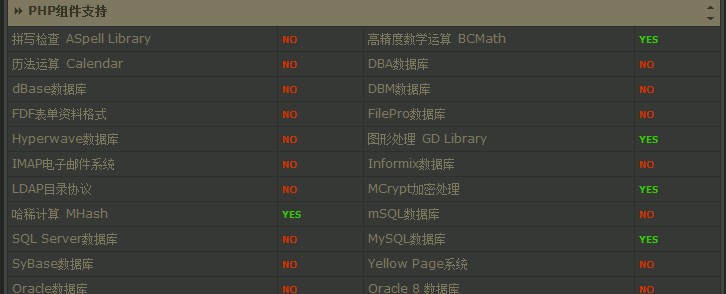
安裝IMAP模塊后:
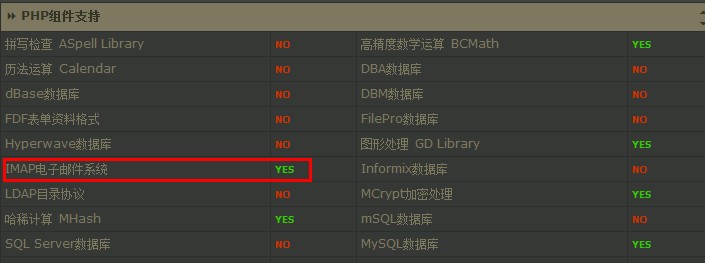
二、安裝exif模塊
安裝exif不需要另外安裝庫,所以省略掉了安裝庫的步驟。
比如php的源碼目錄為:/root/lnmp1.3-full/src/php-5.4.45/
則執(zhí)行:cd /root/lnmp1.3-full/src/php-5.4.45/ext/
我們要安裝exif模塊,執(zhí)行cd exif/
再執(zhí)行 /usr/local/php/bin/phpize 會返回如下信息:
Configuring for:
PHP Api Version:???????? 20041225
Zend Module Api No:????? 20060613
Zend Extension Api No:?? 220060519
再執(zhí)行以下命令:
[root@vpser imap]# ./configure --with-php-config=/usr/local/php/bin/php-config [root@vpser imap]# make && make install執(zhí)行完返回:
Build complete.
Don't forget to run 'make test'.
Installing shared extensions:???? /usr/local/php/lib/php/extensions/no-debug-non-zts-20060613/
表示已經成功,再修改/usr/local/php/etc/php.ini
查找:extension = 再最后一個extension= 后面添加上extension = "exif.so"
保存,執(zhí)行/etc/init.d/php-fpm restart 重啟。
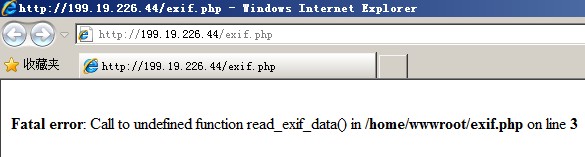
在/home/wwwroot/下面創(chuàng)建一個exif.php的文件,內容如下:
<?php
$exif = read_exif_data ('IMG_0001.JPG');
while(list($k,$v)=each($exif)) {
echo "$k: $v<br>\n";
}?>
其中IMG_0001.JPG為照片文件。
未安裝exif模塊前:
安裝exif模塊后:
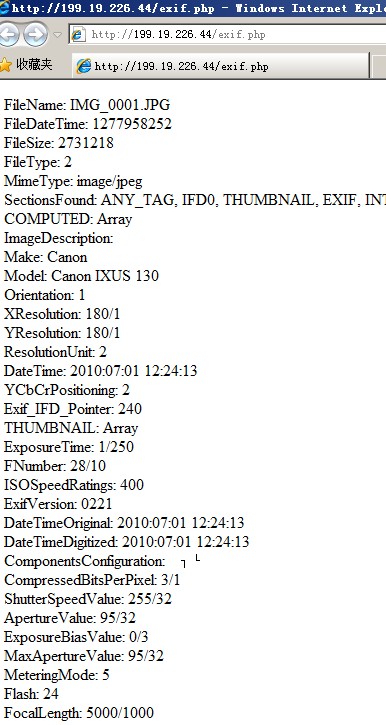
可以讀出照片的exif信息。
安裝其他模塊也基本上都是這兩種方式,當./configure --with-php-config=/usr/local/php/bin/php-config 執(zhí)行這個的時候是會檢查系統(tǒng)上庫是否安裝上,如果沒有安裝上就會報錯,按錯誤提示安裝相關的庫就行。
pecl方式安裝
pecl方式安裝是使用pecl install xxx 命令的方式,xxx為php模塊名字,但是該php模塊必須是 https://pecl.php.net 上面的且必須要提前按要求安裝好依賴包,不同php模塊可能不需要也可以需要安裝,具體可以官網(wǎng)手冊 https://www.php.net/manual/en/index.php 中查詢。
lnmp默認禁用掉了部分php函數(shù),需要將exec、popen、readlink這些函數(shù)從禁用函數(shù)中去掉,可以在/usr/local/php/etc/php.ini 中查找disable_function 就可以在后面看到是否有禁用函數(shù)。
安裝好依賴包就可以直接,pecl install xxx 進行安裝php模塊。
如果還有其他問題,可以到https://bbs.vpser.net提問,記得提問前在https://bbs.vpser.net/search.php搜索一下哦。
>>轉載請注明出處:VPS偵探 本文鏈接地址:http://www.0794baidu.com/manage/lnmp-php-install-ext.html








@Andy, 提前前可以到論壇里搜索一下,http://bbs.vpser.net/thread-6120-1-1.html
在Centos5下可以成功編譯。
但是在Centos6-64bit編譯imap時出現(xiàn):
checking for IMAP support... yes, shared
checking for IMAP Kerberos support... yes
checking for IMAP SSL support... yes
checking for utf8_mime2text signature... new
checking for U8T_DECOMPOSE...
checking for pam_start in -lpam... yes
checking for crypt in -lcrypt... yes
configure: error: Cannot find imap library (libc-client.a). Please check your c-client installation.
怎么解決啊。
謝謝啦。
@祝正江, 前面的一步報錯了吧
執(zhí)行"make && make install” 報錯 “make: *** No targets specified and no makefile found. Stop.”
我從來就沒有改過路徑,路徑沒有錯,但就是一直提示找不到php-config, 搞不懂了,可以幫我想想辦法不?
@tt, --with-php-config=PATH PATH換成你的php-config的路徑。configure: error: This c-client library is built with Kerberos support. 參見:http://bbs.vpser.net/viewthread.php?tid=1557&page=1&fromuid=3#pid4466
一直提示找不到php-config,難道要重新編譯安裝php?怎么編譯安裝?最好可以告訴代碼,新手,謝謝
執(zhí)行這個./configure --with-php-config=/usr/local/php/bin/php-config命令的時候,提示如下錯誤
configure: error: This c-client library is built with Kerberos support.
Add --with-kerberos to your configure line. Check config.log for details.
我就在php-config里的增加了‘--with-kerberos'
再次執(zhí)行./configure --with-php-config=/usr/local/php/bin/php-config
提示錯誤configure: error: Cannot find php-config. Please use --with-php-config=PATH 找不到php-config這個文件,即使我把php-config改回去,依然提示找不到php-config文件,
怎么回事?
@無名指, 安裝imap需要一些其他的依賴包,詳細查看http://bbs.vpser.net/viewthread.php?tid=1150
checking for gawk... gawk
checking for IMAP support... yes, shared
checking for IMAP Kerberos support... no
checking for IMAP SSL support... no
checking for utf8_mime2text signature... new
checking for U8T_DECOMPOSE...
checking for pam_start in -lpam... yes
checking for crypt in -lcrypt... yes
configure: error: Cannot find imap library (libc-client.a). Please check your c-client installation.
沒有安裝庫?
@teddy,
configure: error: This c-client library is built with Kerberos support.
Add --with-kerberos to your configure line. Check config.log for details.這里已經提示錯誤原因了。
執(zhí)行configure哪一步時在編譯參數(shù)上加上--with-kerberos 再重新編譯,不報錯了再make
按此方法安裝imap模塊沒成功.
裝到[root@vpser imap]# ./configure --with-php-config=/usr/local/php/bin/php-config這一步提示如下:
[root@tedy imap]# ./configure --with-php-config=/usr/local/php/bin/php-config
checking for egrep... grep -E
checking for a sed that does not truncate output... /bin/sed
checking for cc... cc
checking for C compiler default output file name... a.out
checking whether the C compiler works... yes
checking whether we are cross compiling... no
checking for suffix of executables...
checking for suffix of object files... o
checking whether we are using the GNU C compiler... yes
checking whether cc accepts -g... yes
checking for cc option to accept ANSI C... none needed
checking how to run the C preprocessor... cc -E
checking for icc... no
checking for suncc... no
checking whether cc understands -c and -o together... yes
checking for system library directory... lib
checking if compiler supports -R... no
checking if compiler supports -Wl,-rpath,... yes
checking build system type... i686-pc-linux-gnu
checking host system type... i686-pc-linux-gnu
checking target system type... i686-pc-linux-gnu
checking for PHP prefix... /usr/local/php
checking for PHP includes... -I/usr/local/php/include/php -I/usr/local/php/include/php/main -I/usr/local/php/include/php/TSRM -I/usr/local/php/include/php/Zend -I/usr/local/php/include/php/ext -I/usr/local/php/include/php/ext/date/lib
checking for PHP extension directory... /usr/local/php/lib/php/extensions/no-debug-non-zts-20060613
checking for PHP installed headers prefix... /usr/local/php/include/php
checking if debug is enabled... no
checking if zts is enabled... no
checking for re2c... no
configure: WARNING: You will need re2c 0.13.4 or later if you want to regenerate PHP parsers.
checking for gawk... gawk
checking for IMAP support... yes, shared
checking for IMAP Kerberos support... no
checking for IMAP SSL support... no
checking for utf8_mime2text signature... old
checking for U8T_CANONICAL... no
checking for pam_start in -lpam... no
checking for crypt in -lcrypt... yes
configure: error: This c-client library is built with Kerberos support.
Add --with-kerberos to your configure line. Check config.log for details.
好象沒有kerberos.
裝到[root@vpser imap]# make && make install提示如下:
make: *** No targets specified and no makefile found. Stop.
請回咋辦
用的是lnmp0.4
@shiny, 我這邊正常,通過webkaka測試的地市也都是正常的。
vpser GFWed?
@vowanson, 無法平滑升級,肯定會中斷一小會兒。按照lnmp腳本下載新版的php,重新編譯安裝,然后重啟就可以。
?? ??
有沒有平滑升級PHP的方法哦,就是不需要重裝PHP的升級到5.2.14.
