The post LNMP一鍵安裝包 0.5 正式發(fā)布 first appeared on VPS偵探.
]]>
LNMP一鍵安裝包是一個用Linux Shell編寫的可以為CentOS/RadHat、Debian VPS(VDS)或獨立主機安裝LNMP(Nginx、MySQL、PHP、phpMyAdmin)生產(chǎn)環(huán)境的Shell程序。
主要針對LNMP安裝腳本進行了優(yōu)化,減少因為環(huán)境差異引起的安裝錯誤,其次對Nginx、PHP、MySQL等主要程序進行了版本升級。同時優(yōu)化了eAccelerator和增加ionCube安裝程序,Zend Optimizer、eAccelerator和、ionCube可以完美共存。
LNMP一鍵安裝包 0.5已經(jīng)在DiaHosting、BuyVM、Linode等幾家美國VPS的CentOS、Debian的32位和64位系統(tǒng)上測試通過。(...)
點擊閱讀LNMP一鍵安裝包 0.5 正式發(fā)布全文
? VPS偵探 2010. |
文章鏈接 |
27 comments
標(biāo)簽: 0.5, CentOS, Debian, LNMP, LNMP一鍵安裝包, 一鍵安裝包
 美國VPS推薦 | 提供美國及海外VPS/域名代購代付,LNMP環(huán)境安裝配置、問題排查等服務(wù)。 QQ:503228080
The post LNMP一鍵安裝包 0.5 正式發(fā)布 first appeared on VPS偵探.
]]>The post DiaHosting 支持Debian32位、更新內(nèi)核、gnome圖形界面 first appeared on VPS偵探.
]]>DiaHosting 1月份雙倍內(nèi)存超值優(yōu)惠讓vpser足足的嘗到了些甜頭,剛到2月DiaHosting除了雙倍內(nèi)存的優(yōu)惠,還給我們這些vpser們帶來了幾個好消息:流量查看面板支持VPS關(guān)機、開機、重啟,通過pvgrub更新內(nèi)核,Debian 32位、gnome圖形操作界面,下面看一下詳細(xì)的介紹吧。
1. https://cp.diahosting.com增加VPS控制功能,目前可以進行開機,關(guān)機,重啟。(注:重裝系統(tǒng)還是需要通過xen-shell來進行)
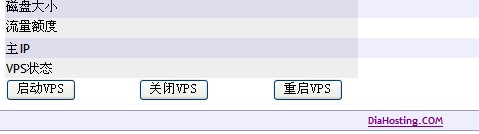
2. 所有新的VPS將使用pvgrub, 通過pvgrub,VPS將不再使用DiaHosting主服務(wù)器上的內(nèi)核,而是使用VPS內(nèi)的系統(tǒng)內(nèi)核,這將使DiaHosting的VPS更加接近真實環(huán)境,同時用戶可以自行更新內(nèi)核。(...)
點擊閱讀DiaHosting 支持Debian32位、更新內(nèi)核、gnome圖形界面全文
? VPS偵探 2010. |
文章鏈接 |
No comment
標(biāo)簽: Debian, DiaHosting, gnome, pvgrub, 更新內(nèi)核
美國VPS推薦 | 提供美國及海外VPS/域名代購代付,LNMP環(huán)境安裝配置、問題排查等服務(wù)。 QQ:503228080
The post DiaHosting 支持Debian32位、更新內(nèi)核、gnome圖形界面 first appeared on VPS偵探.
]]>The post LNMP Debian/Ubuntu下Nginx+MySQL+PHP+phpMyAdmin+Zend一鍵安裝包 first appeared on VPS偵探.
]]>
 ??
?? 
因為個人原因,LNMP經(jīng)過幾次跳票終于發(fā)布了,此次發(fā)布的是在Debian或者Ubuntu下的Nginx、PHP、MySQL、phpMyAdmin、Zend一鍵安裝包,可以在VPS、獨立主機上輕松的安裝LNMP生產(chǎn)環(huán)境。
LNMP V0.3 for?Debian/Ubuntu軟件版本說明(2009年11月10日更新):
Nginx:0.7.63
PHP:5.2.10
MySQL:5.0.51a
Zend Optimizer :3.3.9
eaccelerator:0.9.5.3
使用說明:(請盡量選用32位,D64位問題已經(jīng)解決,可以正常使用)
如果系統(tǒng)預(yù)安裝Apahce或你已經(jīng)安裝Apache,請先運行 killall apache2 ,再執(zhí)行 apt-get remove apache2 ,刪除Apache!(此步已經(jīng)再V0.3新版添加,可以不用操作。)
登陸Linux,下載LNMP壓縮包,并解壓. (一些朋友可能不知道怎么弄,登陸VPS或者主機,
執(zhí)行命令 wget?http://soft.vpser.net/lnmp/lnmp0.3.tar.gz ,將lnmp0.3.tar.gz下載到VPS中,執(zhí)行 tar zxvf lnmp0.3.tar.gz解壓LNMP一鍵安裝包)。
執(zhí)行命令 cd lnmp0.3
然后32位系統(tǒng)執(zhí)行./debian.sh? 64位系統(tǒng)執(zhí)行./debian64bit.sh?,輸入要綁定的域名,回車后。程序會自動安裝編譯Nginx、PHP、MySQL、phpMyAdmin、Zend這幾個軟件。安裝大約10分鐘左右需要設(shè)置MySQL root用戶的密碼。
如果需要安裝eaccelerator,執(zhí)行./eaccelerator.sh 就可以了。
程序安裝路徑:
MySQL :?? /usr/bin
MySQL數(shù)據(jù)庫: /var/lib/mysql
PHP :???? /usr/local/php
Nginx :?? /usr/local/nginx
PHPMyAdmin /home/wwwroot/phpmyadmin
Web目錄??? /home/wwwroot/
添加虛擬主機:
修改/usr/local/nginx/conf/nginx.conf 文件
在
server
?{
??listen? 80;
??server_name? status.lnmp.org;
??location / {
???stub_status on;
???access_log?? off;
??}
?}
后面添加上下面代碼:
server
?{
??listen?????? 80;
??server_name www.lnmp.org;
??index index.html index.htm index.php;
??root? /web/www/abc;
??location ~ .*\.(php|php5)?$
???{
????fastcgi_pass? unix:/tmp/php-cgi.sock;
????#fastcgi_pass? 127.0.0.1:9000;
????fastcgi_index index.php;
????include fcgi.conf;
???}
??location ~ .*\.(gif|jpg|jpeg|png|bmp|swf)$
???{
????expires????? 30d;
???}
??location ~ .*\.(js|css)?$
???{
????expires????? 12h;
???}
??access_log?? off;
?}
再執(zhí)行kill -HUP `cat /usr/local/nginx/logs/nginx.pid`虛擬機就生效了。
通過下面這幾個鏈接查看phpinfo和管理MySQL
phpinfo: http://domain.name/phpinfo.php
PHP探針:http://domain.name/p.php
phpMyAdmin:http://domain.name/phpmyadmin
此版本為測試版本,已經(jīng)在DiaVPS、RASHOST、Linode、SWVPS、thenynoc.com、rapidxen、BoxVPS、VMware Debian最小化安裝 上測試成功。
QQ交流群:VPS群:7617036?? Linux群:12327692
反饋網(wǎng)址:CentOS/RedHat版 http://blog.licess.cn/lnmp/
Debian/Ubuntu版 http://blog.licess.cn/lnmp-debian-ubuntu/
交流論壇: https://bbs.vpser.net
下載地址:http://soft.vpser.net/lnmp/lnmp0.3.tar.gz
友情提示:Linux下操作請注意大小寫。
相關(guān)文章:
? VPS偵探 2009. |
文章鏈接 |
13 comments
標(biāo)簽: Debian, Linux, LNMP, Nginx, Ubuntu
美國VPS推薦 | 提供美國及海外VPS/域名代購代付,LNMP環(huán)境安裝配置、問題排查等服務(wù)。 QQ:503228080
The post LNMP Debian/Ubuntu下Nginx+MySQL+PHP+phpMyAdmin+Zend一鍵安裝包 first appeared on VPS偵探.
]]>The post Debian VPS 安裝安裝(Lighttpd+MySQL+Zend+vsftpd+PHPMyAdmin)Web環(huán)境 first appeared on VPS偵探.
]]>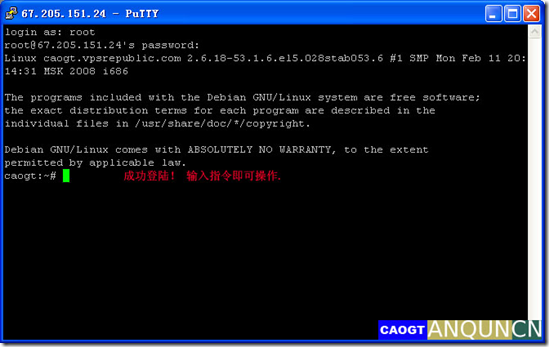
1.0 打開HyperVM控制面板 管理VPS,成功登陸后;
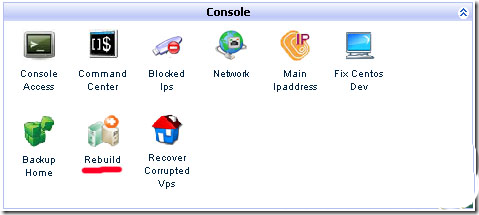
1.1.0 選擇Rebuild
 ?(...)
點擊閱讀Debian VPS 安裝安裝(Lighttpd+MySQL+Zend+vsftpd+PHPMyAdmin)Web環(huán)境全文
? VPS偵探 2009. |
文章鏈接 |
9 comments
標(biāo)簽: Debian, Lighttpd, MySQL, VPS, Web
美國VPS推薦 | 提供美國及海外VPS/域名代購代付,LNMP環(huán)境安裝配置、問題排查等服務(wù)。 QQ:503228080
The post Debian VPS 安裝安裝(Lighttpd+MySQL+Zend+vsftpd+PHPMyAdmin)Web環(huán)境 first appeared on VPS偵探.
]]>