Linux VPS上使用kingate搭建socks代理服務器
kingate是一位國人開發的代理服務器,支持http,socks,ftp等多種協議。支持多線程、tcp端口映射、規則控制、時間控制、用戶認證、http管理等功能。
kingate官網:http://sourceforge.net/projects/kingate/
安裝所需的依賴包
Debian:
CentOS:
安裝kingate
wget http://softlayer.dl.sourceforge.net/project/kingate/kingate/2.0/kingate-2.0.tar.gz
tar xzf kingate-2.0.tar.gz
cd kingate-2.0/
./configure --prefix=/usr/local/kingate
make && make install
配置kingate
修改/usr/local/kingate/etc/kingate.conf 為以下內容:
http off
ftp off
pop3 off
smtp off
telnet off
socks on
mms off
rtsp off
manage on
max 2000
max_per_ip 0
min_free_thread 3
http_port 8082
http_accelerate off
x_forwarded_for on
http_time_out 30
ftp_port 2121
ftp_time_out 300
pop3_port 1100
pop3_time_out 300
smtp_port 2525
smtp_time_out 300
telnet_port 2323
telnet_time_out 300
socks_port 20120
socks_time_out 300
socks5_user off
mms_port 1755
mms_time_out 300
rtsp_port 5540
rtsp_time_out 300
manage_port 8822
manage_time_out 300
log_model user
log_level 0
log_rotate {0 0,1,2,3,4,5,6,7,8,9,10,11,12,13,14,15,16,17,18,19,20,21,22,23 * * * }
log_close_msg on
mem_min_cache 50m
mem_max_cache 12m
disk_min_cache 20m
disk_max_cache 30m
use_disk_cache off
refresh never
refresh_time 300
user_time_out 0
mem_cache 50m
disk_cache 100m
max_deny_per_ip 0
max_queue_thread 15
min_limit_speed_size 1m
limit_speed 20k
max_request 50
total_seconds 10
bind_addr
run_user
insert_via off
以上配置中,socks on 表示啟用socks代理(也可以根據你自己的需求開啟其他類型的代理),socks_port 20120 表示socks代理的端口。manage on 為啟用http管理,manage_port 8822 為http管理的端口。強烈建議修改端口號!
kingate啟動及管理
下載啟動腳本及添加權限
wget?http://soft.vpser.net/proxy/kingate/kingate.init.d
mv kingate.init.d /etc/init.d/kingate
chmod +x /etc/init.d/kingate
kingate管理
啟動kingate:
關閉kingate:
重啟kingate:
http管理
管理地址:http://ip:8822 ,如果修改過配置,8822端口修改為你設置的端口號,默認用戶名為root,密碼為kingate。
加入開機啟動
Debian執行:
CentOS執行:
客戶端設置
這里以dropbox為例:
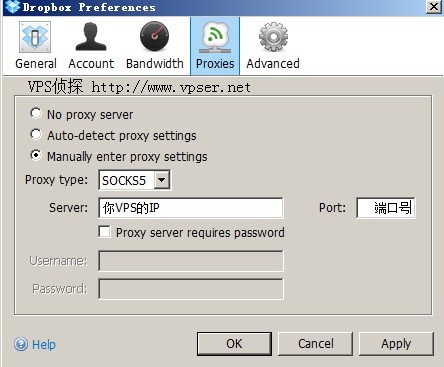
如有問題歡迎在本文或論壇反饋!
原創文章謝絕轉載!
>>轉載請注明出處:VPS偵探 本文鏈接地址:http://www.0794baidu.com/build/linux-vps-use-kingate-install-proxy-server.html








回復7樓問題:
這個問題今天仔細看了一把,估計作者也知道這毛病所以提供了-f的選項
需要知道安裝目錄,然后直接運行加-f參數可以重置,默認的話:
/usr/local/kingate/bin/kingate -f
成功啟動之后再重新開就好了。
wget http://ncu.dl.sourceforge.net/project/kingate/kingate/2.1/kingate-2.1.tar.gz
tra xzf kingate-2.1.tar.gz
cd kingate-2.1/
./configure --prefix=/usr/local/kingate
make && make install
2.1的已經發布,但在debian上編程過程中出錯,用戶2.0就成功了,但是安裝成功后還要怎樣設置?http后臺能進去,但是代理上不了。
@新手, 登錄管理界面加
軍哥,成功了。為什么是透明的代理呀,怎么加賬號密碼哦。。。。
我這里安裝后,checkip.org顯示的vps的ip,而checkip.dyndns.org顯示卻還是實際的ip,試了一下翻墻無效,看樣子是透明代理
我安裝后,checkip.org顯示的是vps的地址,而通過checkip.dyndns.org卻還是實際的地址,實際翻墻還是會被墻
@雨蕁, 上下都消耗vps的流量。
軍哥,這個代理上去后 上網和下載產生的流量是VPS的嗎,還是不會損耗VPS一丁點的流量
/etc/init.d/kingate start
Starting kingate: kingate 2.0 Author king(email:khj99@tom.com)
http://sourceforge.net/projects/kingate/
sizeof fd_set is:128
start error,have another kingate (pid=6141) running.
try (kingate -q) to close it.
if you are sure of none kingate be running,try (kingate -f) to start server.
這是怎么情況?我重啟了還是這樣,而且那個pid=6141 進程壓根沒有……
為啥我裝完以后,瀏覽器的IP上查IP的網站查發現已經是我美國的VPS的IP了,但還是上不了被墻的網站啊。。。
難道是GFW神器升級,這種東西根本穿不透?
注:在vps上能Ping通那些網站,應該是配置或者傳輸過程中出了一點問題
@istef, 應該是代碼的問題,不太好辦,要不找個deb或rpm包試試吧
@VPSer 編譯過程都在下面了,幫忙看看是哪里出了問題,謝謝
davidbeck@yardvps:~/kingate-2.0# uname && uname -r
Linux
2.6.32-305-ec2
davidbeck@yardvps:~/kingate-2.0# ./configure --prefix=/usr/local/kingate
checking build system type... x86_64-unknown-linux-gnu
checking host system type... x86_64-unknown-linux-gnu
checking target system type... x86_64-unknown-linux-gnu
checking for a BSD-compatible install... /usr/bin/install -c
checking whether build environment is sane... yes
checking for gawk... no
checking for mawk... mawk
checking whether make sets $(MAKE)... yes
checking for g++... g++
checking for C++ compiler default output file name... a.out
checking whether the C++ compiler works... yes
checking whether we are cross compiling... no
checking for suffix of executables...
checking for suffix of object files... o
checking whether we are using the GNU C++ compiler... yes
checking whether g++ accepts -g... yes
checking for style of include used by make... GNU
checking dependency style of g++... gcc3
checking whether make sets $(MAKE)... (cached) yes
checking for inline... inline
checking how to run the C++ preprocessor... g++ -E
checking for grep that handles long lines and -e... /bin/grep
checking for egrep... /bin/grep -E
checking for ANSI C header files... yes
checking for sys/wait.h that is POSIX.1 compatible... yes
checking for sys/types.h... yes
checking for sys/stat.h... yes
checking for stdlib.h... yes
checking for string.h... yes
checking for memory.h... yes
checking for strings.h... yes
checking for inttypes.h... yes
checking for stdint.h... yes
checking for unistd.h... yes
checking arpa/inet.h usability... yes
checking arpa/inet.h presence... yes
checking for arpa/inet.h... yes
checking fcntl.h usability... yes
checking fcntl.h presence... yes
checking for fcntl.h... yes
checking for inttypes.h... (cached) yes
checking locale.h usability... yes
checking locale.h presence... yes
checking for locale.h... yes
checking netdb.h usability... yes
checking netdb.h presence... yes
checking for netdb.h... yes
checking netinet/in.h usability... yes
checking netinet/in.h presence... yes
checking for netinet/in.h... yes
checking for stdlib.h... (cached) yes
checking for string.h... (cached) yes
checking for strings.h... (cached) yes
checking sys/file.h usability... yes
checking sys/file.h presence... yes
checking for sys/file.h... yes
checking sys/ioctl.h usability... yes
checking sys/ioctl.h presence... yes
checking for sys/ioctl.h... yes
checking sys/socket.h usability... yes
checking sys/socket.h presence... yes
checking for sys/socket.h... yes
checking sys/time.h usability... yes
checking sys/time.h presence... yes
checking for sys/time.h... yes
checking syslog.h usability... yes
checking syslog.h presence... yes
checking for syslog.h... yes
checking for unistd.h... (cached) yes
checking zlib.h usability... yes
checking zlib.h presence... yes
checking for zlib.h... yes
checking dlfcn.h usability... yes
checking dlfcn.h presence... yes
checking for dlfcn.h... yes
checking sstream usability... yes
checking sstream presence... yes
checking for sstream... yes
checking for an ANSI C-conforming const... yes
checking for uid_t in sys/types.h... yes
checking for inline... (cached) inline
checking for pid_t... yes
checking for size_t... yes
checking whether time.h and sys/time.h may both be included... yes
checking whether struct tm is in sys/time.h or time.h... time.h
checking for ctime_r have len... no
checking for socklen_t... yes
checking for u_long... yes
checking for working memcmp... yes
checking for sys/time.h... (cached) yes
checking for unistd.h... (cached) yes
checking for alarm... yes
checking for working mktime... no
checking whether strerror_r is declared... yes
checking for strerror_r... yes
checking whether strerror_r returns char *... yes
checking for vprintf... yes
checking for _doprnt... no
checking for wait3 that fills in rusage... yes
checking for gethostbyname_r... yes
checking for gettimeofday... yes
checking for inet_ntoa... yes
checking for localtime_r... yes
checking for memchr... yes
checking for memset... yes
checking for select... yes
checking for socket... yes
checking for strcasecmp... yes
checking for strchr... yes
checking for strdup... yes
checking for strncasecmp... yes
checking for strrchr... yes
checking for strstr... yes
checking for strtol... yes
checking for ctime_r... yes
checking for daemon... yes
configure: creating ./config.status
config.status: creating Makefile
config.status: WARNING: 'Makefile.in' seems to ignore the --datarootdir setting
config.status: creating src/Makefile
config.status: WARNING: 'src/Makefile.in' seems to ignore the --datarootdir setting
config.status: creating src/config.h
config.status: src/config.h is unchanged
config.status: executing depfiles commands
davidbeck@yardvps:~/kingate-2.0# make
Making all in src
make[1]: Entering directory `/davidbeck/kingate-2.0/src'
make all-am
make[2]: Entering directory `/davidbeck/kingate-2.0/src'
if g++ -DHAVE_CONFIG_H -I. -I. -I. -g -O0 -D_REENTRANT -DLINUX -MT KConfig.o -MD -MP -MF ".deps/KConfig.Tpo" -c -o KConfig.o KConfig.cpp; \
then mv -f ".deps/KConfig.Tpo" ".deps/KConfig.Po"; else rm -f ".deps/KConfig.Tpo"; exit 1; fi
if g++ -DHAVE_CONFIG_H -I. -I. -I. -g -O0 -D_REENTRANT -DLINUX -MT http://ftp.o -MD -MP -MF ".deps/ftp.Tpo" -c -o http://ftp.o http://ftp.cpp; \
then mv -f ".deps/ftp.Tpo" ".deps/ftp.Po"; else rm -f ".deps/ftp.Tpo"; exit 1; fi
if g++ -DHAVE_CONFIG_H -I. -I. -I. -g -O0 -D_REENTRANT -DLINUX -MT allow_connect.o -MD -MP -MF ".deps/allow_connect.Tpo" -c -o allow_connect.o allow_connect.cpp; \
then mv -f ".deps/allow_connect.Tpo" ".deps/allow_connect.Po"; else rm -f ".deps/allow_connect.Tpo"; exit 1; fi
In file included from oops.h:666,
from allow_connect.cpp:15:
lib.h: In function 'int store_in_chain(char*, int, mem_obj*)':
lib.h:184: warning: deprecated conversion from string constant to 'char*'
lib.h:187: warning: deprecated conversion from string constant to 'char*'
lib.h:191: warning: deprecated conversion from string constant to 'char*'
allow_connect.cpp: In function 'unsigned int allow_connect2(mysocket*, int, const char*, int, long unsigned int&, bool, unsigned int)':
allow_connect.cpp:44: error: cast from 'const char*' to 'int' loses precision
allow_connect.cpp:68: error: cast from 'const char*' to 'int' loses precision
make[2]: *** [allow_connect.o] Error 1
make[2]: Leaving directory `/davidbeck/kingate-2.0/src'
make[1]: *** [all] Error 2
make[1]: Leaving directory `/davidbeck/kingate-2.0/src'
make: *** [all-recursive] Error 1
davidbeck@yardvps:~/kingate-2.0#