Linux VPS上使用kingate搭建socks代理服務器
kingate是一位國人開發的代理服務器,支持http,socks,ftp等多種協議。支持多線程、tcp端口映射、規則控制、時間控制、用戶認證、http管理等功能。
kingate官網:http://sourceforge.net/projects/kingate/
安裝所需的依賴包
Debian:
CentOS:
安裝kingate
wget http://softlayer.dl.sourceforge.net/project/kingate/kingate/2.0/kingate-2.0.tar.gz
tar xzf kingate-2.0.tar.gz
cd kingate-2.0/
./configure --prefix=/usr/local/kingate
make && make install
配置kingate
修改/usr/local/kingate/etc/kingate.conf 為以下內容:
http off
ftp off
pop3 off
smtp off
telnet off
socks on
mms off
rtsp off
manage on
max 2000
max_per_ip 0
min_free_thread 3
http_port 8082
http_accelerate off
x_forwarded_for on
http_time_out 30
ftp_port 2121
ftp_time_out 300
pop3_port 1100
pop3_time_out 300
smtp_port 2525
smtp_time_out 300
telnet_port 2323
telnet_time_out 300
socks_port 20120
socks_time_out 300
socks5_user off
mms_port 1755
mms_time_out 300
rtsp_port 5540
rtsp_time_out 300
manage_port 8822
manage_time_out 300
log_model user
log_level 0
log_rotate {0 0,1,2,3,4,5,6,7,8,9,10,11,12,13,14,15,16,17,18,19,20,21,22,23 * * * }
log_close_msg on
mem_min_cache 50m
mem_max_cache 12m
disk_min_cache 20m
disk_max_cache 30m
use_disk_cache off
refresh never
refresh_time 300
user_time_out 0
mem_cache 50m
disk_cache 100m
max_deny_per_ip 0
max_queue_thread 15
min_limit_speed_size 1m
limit_speed 20k
max_request 50
total_seconds 10
bind_addr
run_user
insert_via off
以上配置中,socks on 表示啟用socks代理(也可以根據你自己的需求開啟其他類型的代理),socks_port 20120 表示socks代理的端口。manage on 為啟用http管理,manage_port 8822 為http管理的端口。強烈建議修改端口號!
kingate啟動及管理
下載啟動腳本及添加權限
wget?http://soft.vpser.net/proxy/kingate/kingate.init.d
mv kingate.init.d /etc/init.d/kingate
chmod +x /etc/init.d/kingate
kingate管理
啟動kingate:
關閉kingate:
重啟kingate:
http管理
管理地址:http://ip:8822 ,如果修改過配置,8822端口修改為你設置的端口號,默認用戶名為root,密碼為kingate。
加入開機啟動
Debian執行:
CentOS執行:
客戶端設置
這里以dropbox為例:
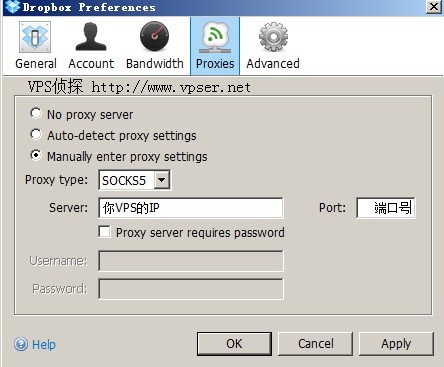
如有問題歡迎在本文或論壇反饋!
原創文章謝絕轉載!
>>轉載請注明出處:VPS偵探 本文鏈接地址:http://www.0794baidu.com/build/linux-vps-use-kingate-install-proxy-server.html








@istef, 這個好像是源代碼的問題,這個是編譯到哪個的時候出現的,還有其他的錯誤嗎
編譯錯誤
allow_connect.cpp: In function 'unsigned int allow_connect2(mysocket*, int, const char*, int, long unsigned int&, bool, unsigned int)':
allow_connect.cpp:44: error: cast from 'const char*' to 'int' loses precision
ubuntu 10.04 64bit ... 求解
要是有一鍵安裝包就好了
@icefree, 感謝指正。
這里以dorpbox為例:
文章的這里面拼寫錯誤吧!
接上次問題,重裝了,用參數-z試了,成功建立cache之后,啟動kingate,如下:
[root@vp ~]# /etc/init.d/kingate start
Starting kingate: kingate 2.0 Author king(email:khj99@tom.com)
http://sourceforge.net/projects/kingate/
sizeof fd_set is:128
Try to read config file:/usr/local/kingate//etc/kingate.conf ...
success!!
total loaded 0 object from disk
[root@vp ~]#
over,小白,不知道接下來該怎么辦了。
@品物流形, 按提示執行/usr/local/kingate/bin/kingate -z
有個比較麻煩的問題,我在一臺新的VPS上安裝了lnamp之后,又裝這個,出現問題了。
所有的操作都一步步照著進行,但是最后啟動的時候,提示無法讀取磁盤緩存,肯定是跟lnamp哪個地方沖突了,如何解決?
Try to read config file:/usr/local/kingate//etc/kingate.conf ...
success!!
Can't read disk cache index.please use kingate -z to format the disk cache,kingate do not use disk cache now
實踐成功
@挨個搞, 謝謝反饋,應該是寫nginx寫習慣了:mrgreen:
加入開機啟動
Debian執行:
update-rc.d -f nginx defaults
------------------------------------
這個開機啟動和nginx有啥關系啊...
好像架設起來后是透明代理 ?? ??
@品物流形, 感謝補充
?? ??
補充一下,初始用戶為root,密碼為kingate
我指的是頁面管理
@sober, 安裝編譯環境所需要的依賴包
yum install make automake gcc gcc-c++ gcc-g77
這句話是什么意思?